Building the Airbnb Host Passport view in Swift 5.9 on iOS
Recreating the Airbnb Host Passport as a flippable, book-like multi-page view in UIKit using transparent views and CATransform3D 3D rotations.
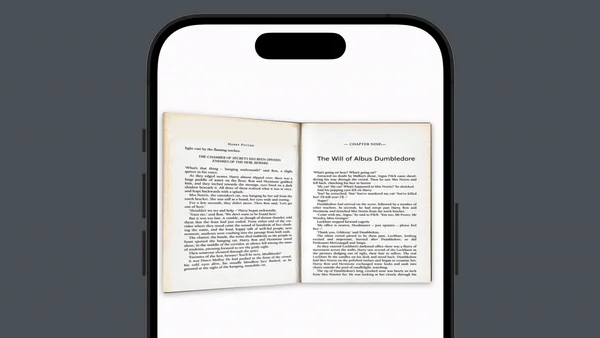
In this interesting challenge, we delve into creating a flippable page effect using UIKit, exploring the nuances of achieving a realistic page-turning animation. The Airbnb Host Passport view is like the book view we are going to build, but with a single page on it. To make it more advanced than just a passport view with a single tap to open it, we have implemented a view that is like a book, with multiple pages.
The beginning
Our analysis begins with understanding the pivotal role of the anchor point in view rotations, which defaults to the center of the view. This central pivoting can lead to a card-like rotation, rather than the desired page-flipping effect.
To overcome this, we opted for a method that avoids direct manipulation of the anchor point. Instead, we employ transparent views where the visible content occupies only half of the view’s space. This technique allows us to create the illusion of a page-turning around its edge while leveraging the default center point for rotation, thus preserving the integrity of other animations and transforms. This approach is inspired by solutions employed by the AirBnB engineering team.
We then explore the transparency and flipping effects, the mechanics of rotating a page around its y-axis, and how the CATransform3D matrix enhances the 3D visual appeal of the page flip. The guide also covers the importance of page composition and layout for a seamless user experience and the setup of a book view to manage interactions and animations.
The anchor point
The anchor point is a property of a view’s bounds, defaulting to the relative [0.5, 0.5], or exact center. Rotation animations rotate around this anchor point, so by default, views rotate around their midpoints, which gives a card-rotating effect rather than a page-flipping one.
To achieve the desired page rotation, we faced a dilemma with the anchor point. Shifting the anchor point to [0, 0.5] in the coordinate space could accomplish the page-turning effect by shifting it to the view’s leading side, but that approach had the potential to disrupt other aspects of the animation. This is because the anchor point is used not only as the basis for rotation but also for other transforms, such as scaling and translation. Altering the anchor point for three-dimensional rotation has a knock-on effect on these other transforms, causing unexpected side effects we would then have to work around.
With this in mind, we used an alternative approach: instead of directly manipulating the anchor point, we created transparent views where the visible content occupied only half of the space. As the rotation occurs, the view seemingly rotates around the left edge, while still leveraging the default center point for the actual rotation.
This allows us to animate our book page rotation without introducing complications to the other transforms. This approach is inspired by the AirBnb engineering team’s approach in their implementation of Host Passport View. Here is how we build the single page view:
let frontSide = page.frontSide
let backSide = page.backSide
let sideFrame: CGRect = .init(
    x: self.bounds.minX,
    y: self.bounds.minY,
    width: self.bounds.width/2,
    height: self.bounds.height
)
frontSide.frame = sideFrame
backSide.frame = sideFrame
Transparency and Flipping
To achieve the flipping effect without directly altering the anchor point, we use transparent views where the visible content occupies only half of the space. This method ensures that as the view rotates, it appears to pivot around the edge, creating a page-turning effect while maintaining the default anchor point for other transformations.
This approach solves the problem of anchor point disruption and maintains the visual integrity of the page flip. The transparency of the view helps to enhance the illusion of page-turning by showing the content of the next page underneath the flipping page at the appropriate moments during the animation.
Flip Page Mechanism
The flip page mechanism involves rotating the page around its y-axis to create the effect of turning a page. This mechanism is the core of the flipping animation, providing the visual effect that makes the interface feel like a real book.
Using CATransform3D to apply 3D transformations, including rotations, to a layer, we add perspective to the transformation matrix to make the rotation appear three-dimensional. The CATransform3D matrix uses a 4x4 matrix to define transformations, with the perspective effect controlled by the m34 element, set to -1.0 / distance (e.g., -1.0 / 500.0). Applying a rotation around the y-axis (CATransform3DMakeRotation) simulates the page-turning.
var transform = CATransform3DIdentity
transform.m34 = -1.0 / 500.0
transform = CATransform3DRotate(
    transform,
    activePageSide.angle,
    0,
    1,
    0
)animator?.stopAnimation(true)
animator = UIViewPropertyAnimator(
duration: flipAnimationTime,
curve: .linear
) {
self.layer.transform = transform
}
animator?.startAnimation()Page composition
Page composition refers to how individual pages are structured and organized within the book view. Each page is represented as a UIView or CALayer containing the necessary content. Proper page composition is essential for managing content and animations effectively. Each page is self-contained, allowing for easy manipulation and interaction.
We create each page using UIView for simplicity and ease of use. Each page contains subviews like UILabel, UIImageView, or custom views to display text, images, or other content. Ensuring the correct layer hierarchy is crucial for managing the z-order of pages during flips, and implementing reusable page views can enhance performance by minimizing the creation of new views.
Page layout
Page layout refers to the spatial arrangement of pages within the book view, ensuring they overlap slightly and are correctly ordered. Proper page layout is crucial for visual appeal and for the flipping animation to work seamlessly. It also ensures that the correct page is always on top during a flip.
Pages overlap slightly to give the appearance of a stack of pages in a book. Managing the z-index (layer order) ensures the right page appears on top. Adjusting the layout dynamically based on the current page and the flipping direction, and using Auto Layout constraints or setting frames manually to position pages correctly, helps maintain the visual structure.
Book View Setup
The book view is a container that holds all the pages and manages their interactions and animations. The book view provides the overall structure and user interface for the book. It handles the setup, layout, and flipping logic for all pages.
The book view manages user interactions, such as tap or swipe gestures, to trigger page flips, and coordinates animations to ensure smooth and cohesive transitions. Adding and removing pages as subviews of the book view and implementing gesture recognizers to detect user interactions and trigger animations help manage the book view. Let’s see how easy is to set a page view and a book view:
let frontView = UIView()
let backView = UIView()
let pageView = FlippablePageView()
let pageModel = FlippablePageModel(
    frontSideView: frontView,
    backSideView: backView
)
pageView.configure(withPage: pageModel)

private let bookView = BookViewXK()
bookView.setPages(pageView)
Going the extra mile: matrix transformations
Are you up for the extra mile in understanding matrix transformations? Let’s go.
Core Animation Transform. Core Animation uses a 4x4 matrix to represent transformations. This matrix allows for complex transformations, including translation, rotation, scaling, and perspective.
| m11 m12 m13 m14 |
| m21 m22 m23 m24 |
| m31 m32 m33 m34 |
| m41 m42 m43 m44 |
Perspective Transform. Perspective transform is the process of representing a 3D object on a 2D plane, where objects farther away appear smaller. In 3D graphics, this effect is crucial for making scenes appear realistic.
Understanding m34. The m34 is an element of the 4x4 transformation matrix used in Core Animation. Specifically, it’s located in the third row and fourth column of the matrix. The general form of a 4x4 transformation matrix is shown above.
The m34 component is used to apply perspective to the transformation. When you set transform.m34 = -1.0 / d, where d is the distance from the viewer to the screen (often referred to as the “eye position” or the “perspective distance”), you are effectively applying a perspective transform.
How m34 Works. The m34 component modifies the Z coordinate, which in turn affects the depth and perspective of the 3D transformation.
By setting m34 = -1.0 / 500.0, you are setting the perspective distance to 500 units. This means objects that are 500 units away from the camera will appear half as large as objects that are 250 units away, creating a realistic depth effect. In essence, the more negative the m34 value, the stronger the perspective effect.
Summary
- m34 is part of the 4x4 transformation matrix in Core Animation.
- It is used to apply perspective to 3D transformations.
- Setting
transform.m34 = -1.0 / dadjusts the perspective distance. - This creates a realistic depth effect by making distant objects appear smaller.
Understanding and using m34 effectively allows you to create more realistic and visually appealing 3D transformations in your applications.
Conclusion
Building a flippable page and book view with UIKit involves a detailed page composition, transparency effects, 3D transformations, precise page layout, comprehensive book view setup, and effective visibility management. Each of these components plays a crucial role in creating an interactive and visually appealing book-like interface on iOS.
Resources
For more information on the topics covered in this document, you can explore the following resources:
- Core Animation Basics by Apple
- Identity matrix by Wikipedia
- Linear transformations Wikipedia
- Transformation matrix by Wikipedia
- Vector Math for 3D Computer Graphics by chortle.ccsu.edu
- How do 3D transforms of iOS views work under the hood? by Alex Lee
- Simple 3D Animations by Kodeco
- Animations: Bringing the Host Passport to Life on iOS by Anne Lu
Thank you for taking the time to read this article on the implementation of mathematical functions in software engineering. I hope it has sparked your curiosity about the intricacies of this essential component. See you in the article, which will be more challenging and fun!
GitHub
Find the full implementation in the GitHub repository: SwiftAndMathematicalChallenges/BookViewXK
Let’s Connect
- LinkedIn: egzon-pllana
- GitHub: egzonpllana